

There is no single winner in the Copilot vs Cursor vs Claude Code debate, because these tools differ in format. Copilot is the easiest to plug into your current IDE, Cursor is a standalone AI editor built on VS Code, and Claude Code runs in the terminal as an agent that reads your project on its own, edits files and runs commands. Below we compare them by price, integrations, models and WordPress development scenarios, and at the end we’ve gathered “choose X if…” verdicts for freelancers and agencies.
Key takeaways
- Copilot is the easiest to start with: it is an extension for your existing IDE, and teams get policies and auditing.
- Cursor suits you if you want an AI editor with Tab autocomplete and an agent in one window.
- Claude Code is strongest at multi-step terminal tasks: refactoring, tests and working with a large codebase.
- A freelancer usually needs one tool plus a second one to try; an agency needs privacy policies and shared project rules.
- Prices, limits and models change, so check the official plan pages before you buy.
Contents
- Summary table: what these tools are
- Copilot vs Cursor vs Claude Code: comparison by key criteria
- IDE, models and agent capabilities: how they differ in practice
- Scenarios: refactoring, WordPress plugins, tests
- Code privacy and security for agencies and outsourcing
- What to choose: conclusions for freelancers and agencies
Summary table: what these tools are
First, a quick overview. Prices and limits change often, so the table shows only the plan structure, and cost guidelines are covered in the next section.

| Parameter | GitHub Copilot | Cursor | Claude Code |
|---|---|---|---|
| Format | Extension for editors | Standalone editor (a VS Code fork by Anysphere) | Terminal agent + extensions for VS Code and JetBrains |
| Where it runs | VS Code, Visual Studio, JetBrains, Neovim and others | Only its own editor | Terminal on any OS, plugins for VS Code and JetBrains |
| Free option | Yes, with limited completions and chat | Hobby plan available | No separate free plan: access via Pro/Max subscriptions or the API |
| Paid plans | Pro, Pro+, Business, Enterprise | Pro, Pro+, Ultra, Teams, Enterprise | Claude Pro, Max or pay-per-token via the API |
| Models | Several models from different providers, some consume premium requests | Models from different providers, monthly limit | Anthropic’s Claude models |
| Agent mode | Agent mode and coding agent (works with GitHub issues, creates pull requests) | Agent in the editor | The primary way of working |
| Project context | Custom repository instructions | Rules, MCP | CLAUDE.md, subagents, hooks, MCP |
| Best for | Everyday coding in a familiar IDE, teams with policies | Working “in one window” with Tab and an agent | Refactoring, tests, multi-file tasks |
We have not run our own benchmarks, so the assessments below rely on vendor documentation and typical scenarios. Before deciding, it’s worth running a two-week trial on your own project, and the end of the article includes a plan for that trial.
Copilot vs Cursor vs Claude Code: comparison by key criteria
Pricing, limits and payment come first, because this is where the approaches differ most.
Pricing and limits
All three vendors have paid plans for individual developers starting at roughly 10–20 USD per month. Higher tiers (Pro+, Ultra, Max) cost many times more. This is a guideline, not a guarantee: check exact amounts and terms on the GitHub Copilot plans and Cursor pricing pages, and for Claude Code on Anthropic’s subscriptions page.
| Tool | How limits are counted | What happens when the limit runs out |
|---|---|---|
| Copilot | Code completions and basic chat within the plan; using specific models and agent features consumes premium requests with multipliers depending on the model | You can buy extra premium requests or wait for the next month |
| Cursor | Monthly model usage quota within the plan | Upgrade to a higher plan or lose access to some models |
| Claude Code | Pro/Max subscriptions have usage limits; with the API you pay per token | Wait for the limit to reset or switch to the API or a higher tier |
The main trap: the subscription price is not the real cost. Agent tasks on large projects consume the most requests and tokens, so a heavy user quickly hits the quota. With the API, costs are more transparent but unpredictable: a long session on a large codebase can cost noticeably more than a subscription.
Payment and availability in Ukraine
These services have no hryvnia pricing: you pay in dollars at your bank’s exchange rate, plus possible fees and taxes depending on your card. Whether your card works depends on your bank and the service’s payment system, so the safest approach is to start with a monthly rather than an annual subscription.
Anthropic publishes a list of supported countries. Check it for Ukraine before paying. Bypassing restrictions through a VPN or intermediaries may violate the terms of service and lead to your account being blocked along with your project history, so it’s a poor foundation for a business.
Don’t buy an annual subscription up front until you’re sure payment goes through reliably and the limits cover your workload.
IDE, models and agent capabilities: how they differ in practice
Let’s first sort out the two modes. Autocomplete (Tab) suggests the next line or block as you type, and you stay fully in control of the code. Agent mode takes a task in plain words, finds the files it needs, makes changes, runs commands and tests, and shows you the result. The first saves seconds on every line, the second saves hours on a whole task, but it demands careful review.
Copilot is strong where you want minimal changes to your environment: the extension works in VS Code, Visual Studio, JetBrains and Neovim, and you don’t need to install a separate editor. It offers agent mode in the editor and a coding agent that takes a task from a GitHub issue and creates a pull request. For teams that live in GitHub, this is a natural workflow.
Cursor is built around AI: Tab autocomplete, an agent, a choice of models from different providers, and project rules (Rules) that define your code style. The price of convenience is that you have to switch to a separate editor. It is compatible with the familiar VS Code interface, so migration is usually painless, but you can’t bring niche JetBrains or Visual Studio extensions with you.
Claude Code works differently: you launch it in the project directory, and it reads the codebase, edits files, runs commands and works with git. For a more thorough overview, see our article Claude Code: how to use it without breaking your project. Among its strengths are CLAUDE.md, subagents, hooks and MCP servers for connecting external tools. We covered the protocol itself in MCP Claude: what it is and how to connect it.
Shared project rules are useful in all three. Here is an example of a short CLAUDE.md for a WordPress plugin:
|
1 2 3 4 5 6 7 8 9 10 11 12 13 14 15 |
# Project: WooCommerce plugin for shipping cost calculation ## Stack - PHP 8.1, WordPress 6.x, WooCommerce - Code standard: WordPress Coding Standards (phpcs) ## Commands - Tests: vendor/bin/phpunit - Linter: vendor/bin/phpcs --standard=WordPress ## Rules - Escape all output: esc_html(), esc_attr() - Sanitize all form data and verify nonces - Don't modify files in /vendor and /languages - Code comments in English, variable names in English |
A similar file can be written as Rules for Cursor or as repository instructions for Copilot. The biggest effect comes not from the choice of tool but from a well-written description of project rules.
As for models: Copilot and Cursor give access to models from different developers, while Claude Code runs on Claude models. Version numbers change every month, so for model comparisons, see the current lists in each service’s documentation. For choosing a tool, something else matters more: whether you need the flexibility to switch between models (Copilot, Cursor) or deep integration of the agent with a single model family (Claude Code).
Scenarios: refactoring, WordPress plugins, tests
Below are three typical agency tasks. We don’t give speed or quality figures because we have no measurements of our own, only advice on what to expect from each approach.
Refactoring a large codebase
Agent tools that can read dozens of files and run tests after changes work best here. Claude Code is built for this: it works from the repository root and manages git. Cursor with its agent gives a similar result, with the advantage of a clear visual review of changes in the editor. Copilot agent mode also fits, and the coding agent lets you hand off a task as an issue and get a pull request for review.
Example prompt: “Move the discount calculation logic from functions.php into a Discount_Calculator class in includes/. Don’t change public behavior. After the changes, run vendor/bin/phpunit and show what failed.”
Before refactoring, create a separate branch and commit a clean state. Then any failed attempt by the agent can be rolled back with a single command.
WordPress plugin development
For small features (a hook, a shortcode, a custom post type), Copilot autocomplete or Cursor’s Tab is enough: they pick up the WordPress API well in an open file. For a new plugin from scratch, with several classes, settings and migrations, an agent that sees the project structure is more convenient. The main risk is the same in all three: code may look correct but ignore escaping, nonces or permission checks. So require these in your project rules and check them yourself, especially in plugins that handle payments.
If you are integrating AI into the sites themselves, not just using it for code, see Claude API WordPress integration: a chatbot and product descriptions.
Writing and fixing tests
An agent that can run tests has an obvious advantage: it sees the error and fixes it in a loop. Claude Code and the agents in Cursor and Copilot do this in the working directory. Autocomplete is useful here only for boilerplate tests.
Example prompt: “Write PHPUnit tests for the Discount_Calculator class: regular discount, zero amount, negative amount, maximum percentage. Run them and fix the tests that fail because of mistakes in the tests themselves, not in the code. If you find a bug in the code, don’t fix it silently, describe it.”
The last sentence matters: otherwise the agent may bend the test to fit the bug instead of finding it. Prompts and comments in Ukrainian are usually understood well, but it’s better to keep variable names and technical terms in English.
Code privacy and security for agencies and outsourcing
In custom development, the question of “where does the code go” is often more important than price. Copilot Business and Enterprise offer policy management, auditing, content exclusion and a guarantee that client code is not used to train models. For Cursor and Claude Code, the terms depend on the plan and settings: check the privacy mode and data policy for your specific tier. Claude Code can also be connected through Amazon Bedrock and Google Vertex AI if your company already has agreements and data controls there.
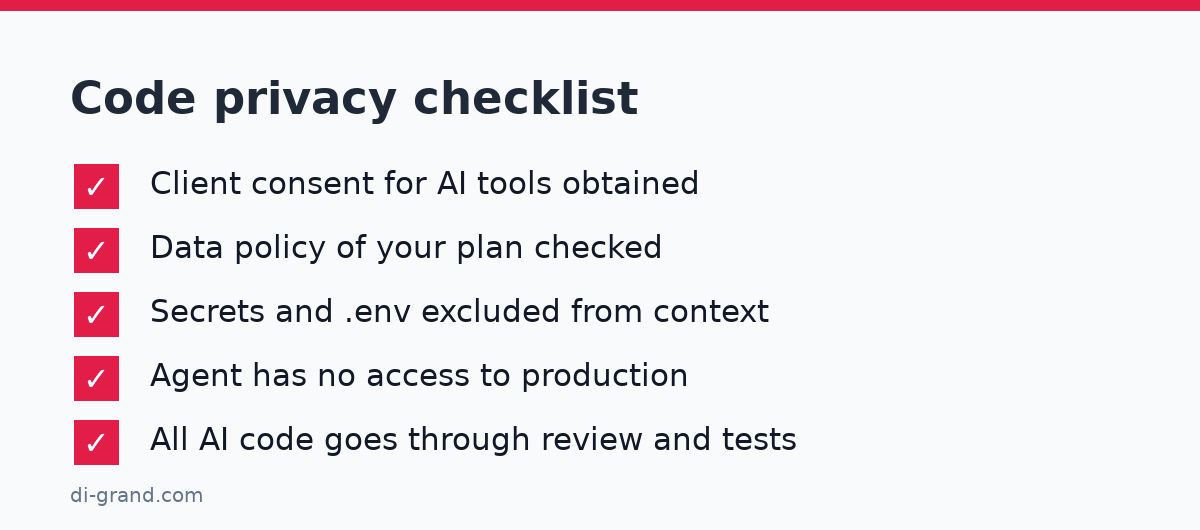
For NDA projects, “everyone does it” isn’t enough. You need the client’s written consent to the use of AI tools and an understanding of which files the agent can see. Be especially careful with .env, API keys, database dumps and personal data of your customer’s clients.
A basic checklist before launching on a client project is shown in the infographic. Also read our article on choosing between Claude and ChatGPT for business, where we discuss similar data questions.
Never leave secrets in the repository or give the agent access to a production server or database: a wrong command in the terminal really gets executed.
What to choose: conclusions for freelancers and agencies
Below are verdicts by type of work. If in doubt, start with whatever changes your current process the least.
| Choose… | If… |
|---|---|
| Copilot | you work in JetBrains, Visual Studio or Neovim and don’t want to change editors; your team lives in GitHub; you need policies, auditing and content exclusion |
| Cursor | you’re ready to switch to an AI editor and want Tab, an agent and a choice of models in one interface; you do a lot of frontend work and quick edits |
| Claude Code | your main tasks are multi-step: refactoring, migrations, tests, working with a large codebase; you’re comfortable in the terminal and git |
For freelancers. Start with one tool. If you work in VS Code and want minimal effort, take Copilot or Cursor. If you often do deep work on other people’s projects, add Claude Code for individual complex tasks. Two subscriptions at 10–20 USD per month can be justified if each covers a different type of task, but don’t buy all three at once. A freelancer should also check that the client’s terms allow the use of AI.
For agencies. Three factors decide here: privacy, shared rules and cost per team. Copilot Business is convenient when you need policies and centralized management. Cursor Teams and Claude Code (via a team plan or the API) require a separate agreement on setup and expense tracking. Whatever you choose, put the rules in the repository (CLAUDE.md, Rules or Copilot instructions), agree on mandatory review of AI code, and keep a record of which projects and data the agent is allowed to access. A combination is fine too: Copilot or Cursor for everyday coding, Claude Code for big tasks.
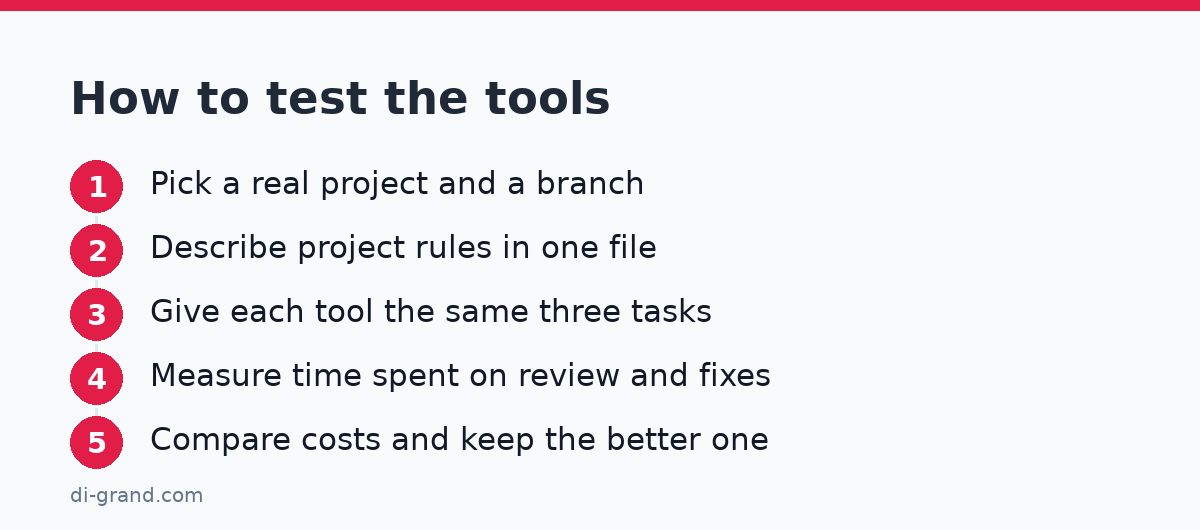
A practical two-week trial plan:
- Pick one real mid-sized project and a separate branch.
- Describe the project rules in one file (stack, test commands, off-limits areas).
- Give each tool the same three tasks: refactoring, a new small module, writing tests.
- Record how much time went into review and fixes, not just generation.
- Review the costs: limits used, extra requests purchased, API tokens.
- Keep the tool after which you spent less time getting a finished, verified result.
A typical trial mistake is judging only the speed of the first answer. The real metric is how many edits it took for the code to pass tests and review.
If you want to bring AI not only into development but also onto a client’s website (a chatbot, AI search, description generation), read about the options in AI chatbot for a WordPress site: options and cost. The DiGrand team can help with choosing and setting up everything from AI tools for your development to WordPress/WooCommerce sites with AI features. All you need to do is book a consultation.
FAQ
What is better for a beginner: Copilot, Cursor or Claude Code?
A beginner usually finds it easier to start with Copilot or Cursor, because they work in a familiar editor and show suggestions as you type. Claude Code requires comfort with the terminal and git, and an agent that changes many files can be confusing if you can't yet read a diff. Whichever tool you use, don't accept code you don't understand.
Can these tools be used together?
Yes. A common setup is Copilot or Cursor for everyday coding and Claude Code for big terminal tasks. Claude Code also has extensions for VS Code and JetBrains, so you can run it alongside Copilot. The key is that agents don't change the same files at the same time, so work in separate branches.
Will my code be used to train models?
It depends on the plan and settings. For Copilot Business and Enterprise, GitHub describes a guarantee that client code is not used to train models. For Cursor and Claude Code, read the data policy for your specific tier and, if needed, use privacy modes or enterprise connections.
What should I do when I run out of request limits?
In Copilot you can buy extra premium requests or switch to a cheaper model that uses less of the quota. In Cursor and Claude Code the options are similar: wait for the limit to reset, upgrade your plan or switch to pay-per-token through the API. To avoid hitting the limit, give agents narrow tasks and clear project rules instead of "rewrite everything".
Are these services available in Ukraine?
Availability depends on each service and changes over time. Anthropic publishes a list of supported countries, which you should check before paying. For GitHub and Cursor, also check the current terms, and the payment method depends on your bank. Don't rely on workarounds, because your account may be blocked.
Leave a Reply