

You can connect the Claude API to WordPress in a single evening: a key from the Anthropic Console, a short plugin that sends a request to api.anthropic.com via wp_remote_post(), and two use cases on top — a chatbot and draft product descriptions. The harder part is something else: keeping the key out of the browser, staying within budget and not publishing invented specifications. Below you will find the order of steps, working code and what to check after each step.
This guide assumes WordPress with PHP 8+ and, if needed, WooCommerce. Models, prices and limits change, so check them against the official documentation before launch.
Key takeaways
- Keep your Claude API key on the server only (wp-config.php), and have the chat call your own REST route, not api.anthropic.com from the browser.
- Call the API with wp_remote_post() and three headers: x-api-key, anthropic-version and content-type; handle 429 and 529 errors with retries and a delay.
- Five safeguards keep costs in check: a spending limit in the Console, a daily counter, a per-IP limit, max_tokens and response caching.
- Save product descriptions to a draft, not to the live product description: you need an automated check and a spot review by a person before publishing.
Contents
- Plugin or custom code: what to choose and what to consider in Ukraine
- Claude API WordPress integration: 7 steps and what to check
- Plugin code: API call, key, cache and spending limit
- Website chatbot: REST route, conversation history and abuse protection
- WooCommerce product descriptions: generation and checks before publishing
- How much it costs and how to stay within budget
- Where to start this week
Plugin or custom code: what to choose and what to consider in Ukraine
There are two ways to build a chatbot and descriptions: a ready-made plugin (for example, AI Engine) or a minimal custom plugin of a few dozen lines. A ready-made plugin is faster to start with, while custom code gives you control over the key, limits, prompt format and cache. Before choosing, check whether the current version of the plugin actually supports Claude.
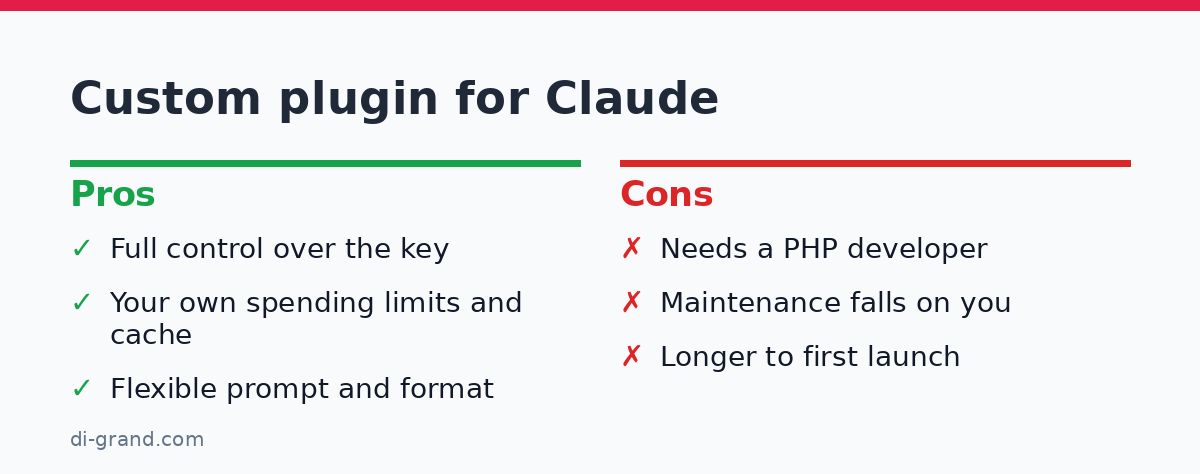
| Criterion | Ready-made plugin | Custom minimal plugin |
|---|---|---|
| Time to launch | An hour or two, no code | An evening or two with a developer |
| Control over prompt and cache | Limited by plugin settings | Full |
| Spending limits | Depend on the plugin | Your own rules in code |
| Maintenance | Updates from the plugin author | Your responsibility |
Choose the model to fit the task. Smaller models in the Haiku series are cheaper and suit bulk description generation and simple chat replies. Use Sonnet when you need more complex reasoning or longer texts, and Opus rarely and selectively. Take exact model identifiers from the Messages API documentation, not from memory or old articles.
Claude works with Ukrainian, but quality depends on the topic: check terminology, grammatical cases and brand names on your own examples. Also check whether Ukraine is on Anthropic’s list of supported countries and which payment methods are available for your account. Terms change, so don’t rely on other people’s screenshots. If you are torn between Claude and other models, compare them in Claude or ChatGPT: which is better for business.
Claude API WordPress integration: 7 steps and what to check
This is the short route. The code for steps 4–6 is given in the following sections.
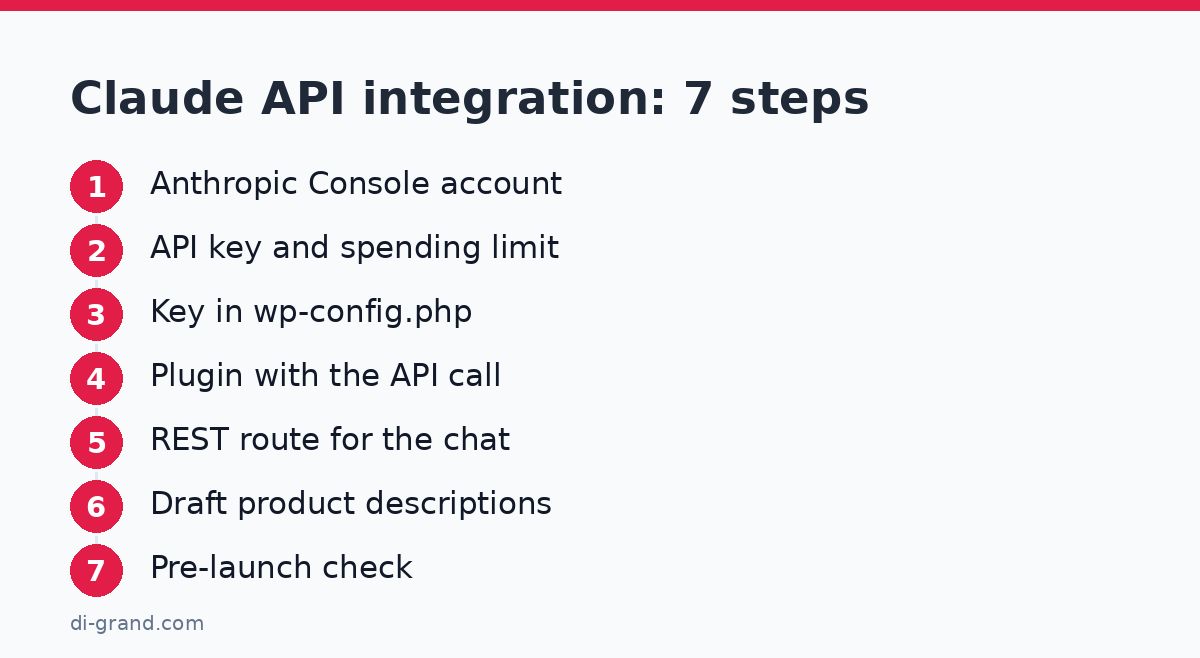
- Anthropic Console account. Sign up, add payment and make sure the account is active. Check: the Console shows a balance or a payment method. Common mistake: confusing a Claude.ai subscription with API access — they are separate products with separate billing.
- API key and spending limit. Create a key in the Console, give it a name such as “wp-site-prod” and set the spending limits available in your account. Check: the key was copied once and isn’t sitting in chats or documents. Common mistake: one key for all projects — if it leaks, you have to revoke everything at once.
- Key in wp-config.php. Add the constants DG_CLAUDE_KEY and DG_CLAUDE_MODEL (example below). Check: the key is not in the database, theme, JS files or repository. Common mistake: storing the key in WordPress options in plain text or pasting it into a widget script.
- Plugin with an API call function. Create a plugin file with the function dg_claude_request(). Check: a test call via WP-CLI (wp eval) returns text, not an error. Common mistake: leaving out anthropic-version or max_tokens — the API will return a 400 error.
- REST route for the chat. The frontend calls your /wp-json/dg/v1/chat, not Anthropic. Check: a request without a nonce is rejected, and the 21st request in an hour from one IP gets a 429. Common mistake: forgetting that the API doesn’t store history, so the chat “forgets” context.
- Product description generation. The function takes specifications from WooCommerce and writes the result to a draft. Check: across 10 different products there are no invented parameters. Common mistake: writing the response straight into the product description on the live site.
- Pre-launch check. Make a backup, test API failures (disable the key for a minute) and add a line about the AI chat to your privacy policy. Check: when something fails, the user sees a clear message, not a white screen. Common mistake: launching without a backup and a rollback plan; more on that in the article on WordPress backups.
Never put the key in client-side JavaScript or a theme template. Anyone can see it in the page source and spend your balance. The key must live on the server only.
Plugin code: API call, key, cache and spending limit
First, add the following constants to wp-config.php (above the line “That’s all, stop editing”). If your host offers it, it is better to take the key from an environment variable.
define( 'DG_CLAUDE_KEY', 'sk-ant-your-key' );
define( 'DG_CLAUDE_MODEL', 'model-identifier-from-the-documentation' );
Now the main plugin function. It sends a POST to https://api.anthropic.com/v1/messages with the required headers x-api-key, anthropic-version and content-type, and passes model, max_tokens, system and a messages array in the body. Indentation is omitted for readability.
<?php
/* Plugin Name: DiGrand Claude Bridge */
defined( 'ABSPATH' ) || exit;
define( 'DG_SYSTEM', 'Ти помічник інтернет-магазину. Відповідай українською, коротко й лише за наданими даними. Якщо відповіді немає, запропонуй написати менеджеру.' );
function dg_claude_request( $messages, $system, $max_tokens = 500, $cache = false ) {
if ( ! defined( 'DG_CLAUDE_KEY' ) ) { return new WP_Error( 'no_key', 'Ключ не задано' ); }
$ck = 'dg_cl_' . md5( wp_json_encode( array( $messages, $system ) ) );
if ( $cache && ( $hit = get_transient( $ck ) ) ) { return $hit; }
$day = 'dg_calls_' . gmdate( 'Ymd' );
$calls = (int) get_option( $day, 0 );
if ( $calls >= 300 ) { return new WP_Error( 'limit', 'Денний ліміт запитів вичерпано' ); }
$body = array( 'model' => DG_CLAUDE_MODEL, 'max_tokens' => $max_tokens, 'system' => $system, 'messages' => $messages );
for ( $i = 0; $i < 3; $i++ ) {
$r = wp_remote_post( 'https://api.anthropic.com/v1/messages', array(
'timeout' => 45,
'headers' => array( 'x-api-key' => DG_CLAUDE_KEY, 'anthropic-version' => '2023-06-01', 'content-type' => 'application/json' ),
'body' => wp_json_encode( $body ),
) );
if ( is_wp_error( $r ) ) { return $r; }
$code = wp_remote_retrieve_response_code( $r );
if ( in_array( $code, array( 429, 529 ), true ) ) { sleep( 2 ** $i ); continue; }
break;
}
if ( 200 !== $code ) { return new WP_Error( 'api_error', 'Код відповіді: ' . $code ); }
$data = json_decode( wp_remote_retrieve_body( $r ), true );
$text = $data['content'][0]['text'] ?? '';
update_option( $day, $calls + 1, false );
if ( $cache && $text ) { set_transient( $ck, $text, 7 * DAY_IN_SECONDS ); }
return $text;
}
What matters here. Errors 429 (request or token limit exceeded) and 529 (service overloaded) are handled by retrying with pauses of 1, 2 and 4 seconds. This is basic exponential backoff, which the documentation on rate limits also recommends. The 45-second timeout is needed because a long text can take several seconds to generate, and the default 5 seconds in wp_remote_post() is not enough for that.
The cache works through a transient: an identical request with an identical instruction doesn’t go to the API a second time. For product descriptions this helps when you re-run a job; for the chat the cache is off, because every conversation is unique. The daily counter of 300 requests is an emergency safeguard: if something goes into a loop, your bill won’t grow endlessly. Adjust the value to your traffic.
Check after this step: call the function via WP-CLI and get text back. Then repeat the same call with $cache = true and make sure the second response arrives instantly and the counter has not increased.
sleep() pauses block the PHP process. For bulk generation, don’t call the function in a loop while a page is loading: put jobs in a queue (WP-Cron or Action Scheduler) and process a few at a time.
Website chatbot: REST route, conversation history and abuse protection
The browser shouldn’t know anything about Anthropic. It calls your REST route, and the server adds the key and calls Claude. The route is registered with register_rest_route() with a nonce check, and the number of requests is limited by IP.
The Claude API doesn’t store conversation history, so we keep it ourselves: in a transient keyed by session ID (enough for a prototype; for production a separate table is better). With each request we send the whole recent history. We keep only the last 7 messages, so we don’t pay for extra tokens and so the array starts with the user role.
add_action( 'rest_api_init', function () {
register_rest_route( 'dg/v1', '/chat', array(
'methods' => 'POST',
'callback' => 'dg_chat_handler',
'permission_callback' => function ( $req ) { return (bool) wp_verify_nonce( $req->get_header( 'X-WP-Nonce' ), 'wp_rest' ); },
) );
} );
function dg_chat_handler( $req ) {
$rk = 'dg_rl_' . md5( $_SERVER['REMOTE_ADDR'] ?? '' );
$n = (int) get_transient( $rk );
if ( $n >= 20 ) { return new WP_REST_Response( array( 'error' => 'Забагато запитів, спробуйте пізніше' ), 429 ); }
set_transient( $rk, $n + 1, HOUR_IN_SECONDS );
$text = sanitize_text_field( mb_substr( (string) $req->get_param( 'message' ), 0, 500 ) );
$sid = sanitize_key( (string) $req->get_param( 'sid' ) );
if ( '' === $text || '' === $sid ) { return new WP_REST_Response( array( 'error' => 'Порожній запит' ), 400 ); }
$h = get_transient( 'dg_h_' . $sid );
if ( ! is_array( $h ) ) { $h = array(); }
$h[] = array( 'role' => 'user', 'content' => $text );
$h = array_slice( $h, -7 );
$out = dg_claude_request( $h, DG_SYSTEM, 400 );
if ( is_wp_error( $out ) || '' === $out ) { return new WP_REST_Response( array( 'error' => 'Сервіс тимчасово недоступний' ), 503 ); }
$h[] = array( 'role' => 'assistant', 'content' => $out );
set_transient( 'dg_h_' . $sid, $h, 2 * HOUR_IN_SECONDS );
return array( 'reply' => $out );
}
On the frontend, include a small script and pass it the URL and nonce via wp_localize_script(). The request itself looks like this:
fetch( dgChat.url, { method: 'POST', headers: { 'Content-Type': 'application/json', 'X-WP-Nonce': dgChat.nonce }, body: JSON.stringify( { message: text, sid: sid } ) } ).then( r => r.json() ).then( d => show( d.reply || d.error ) );Here sid is a random string the script generates when the chat is first opened. If your site sits behind full-page caching, the nonce can go stale: in that case serve it through a separate uncached request.
How to make the bot answer from your site’s data
A full RAG setup needs search across a knowledge base, but for most small sites a simpler approach is enough. Short rules on delivery, payment, returns and contacts go into the system instruction. For a large knowledge base, you find 3–5 relevant fragments before the call (using WordPress search or a vector index) and add them to the request. Always put this in the system prompt: “If the provided data doesn’t contain the answer, say so and suggest contacting a manager.” This is the main protection against invented delivery terms or warranty.
Privacy and honesty with the user
Everything a visitor types into the chat goes to the API. So state above the input field that an AI is responding, and ask users not to enter passport details, card numbers or other personal data. Add a line to your privacy policy about processing messages by a third-party AI service. Protecting the site itself from hacking is a separate topic, covered in the 12-point checklist.
WooCommerce product descriptions: generation and checks before publishing
The principle is simple: Claude doesn’t invent a product, it formats the data you give it. Take the name, the WooCommerce attributes and, if you have them, your notes. Put the result in a service field as a draft, and a manager moves it into the description after review. WooCommerce provides the WC_Product CRUD class for this, and the finished text can also be written through the store’s REST API.
function dg_product_draft( $id ) {
$p = wc_get_product( $id );
if ( ! $p ) { return false; }
$facts = array( 'Назва: ' . $p->get_name() );
foreach ( $p->get_attributes() as $name => $attr ) {
$facts[] = wc_attribute_label( $name ) . ': ' . $p->get_attribute( $name );
}
$system = 'Ти копірайтер інтернет-магазину. Пиши українською, 100–140 слів, без HTML. Використовуй лише надані характеристики. Якщо даних бракує, нічого не вигадуй і не обіцяй гарантій.';
$msg = array( array( 'role' => 'user', 'content' => implode( PHP_EOL, $facts ) ) );
$out = dg_claude_request( $msg, $system, 600, true );
if ( is_wp_error( $out ) || '' === $out ) { return false; }
update_post_meta( $id, '_dg_ai_draft', wp_kses_post( $out ) );
return true;
}
Run the function from the admin area with a “Generate draft” button or through a queue. On the product edit page, show the draft next to the description field along with an “Approve” button that copies the text into post_content. Examples of a good prompt and text structure are in the article on product page descriptions, and the approach to prompting Claude is the same.
First test the prompt on 10–20 products from different categories using the cheapest model. If the quality is acceptable, move on to the whole catalog. Use a more expensive model only for categories where Haiku makes mistakes.
Automated checks before a manager sees the draft
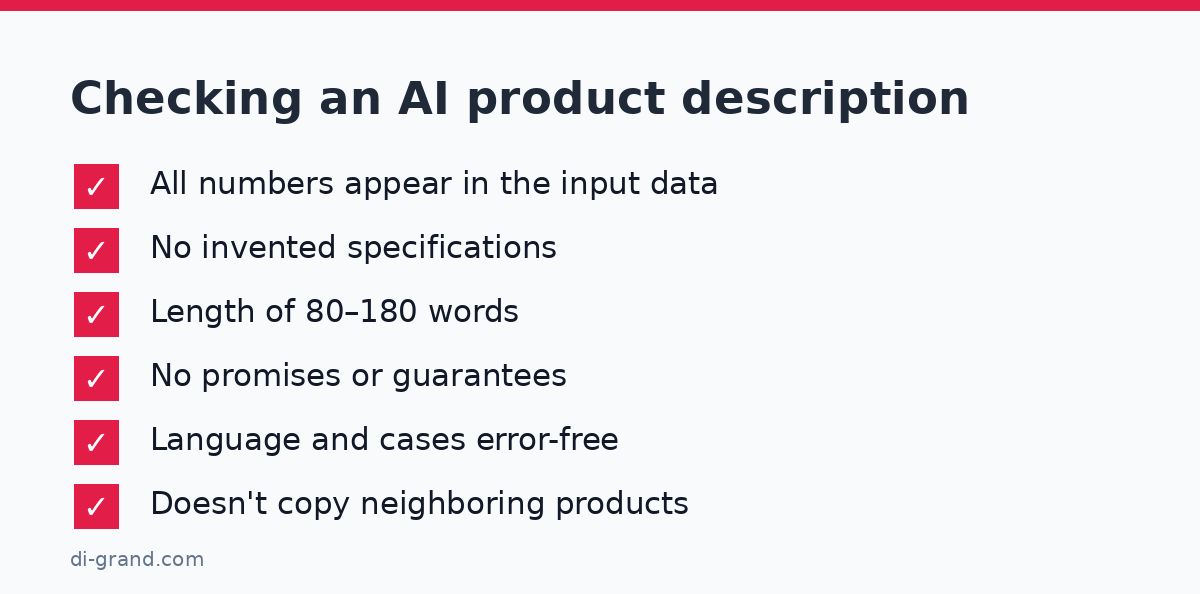
Some errors can be caught by code before a person reviews the text. Reject a draft if:
- the text contains numbers (size, weight, volume, power) that are not in the input specifications;
- the length falls outside the 80–180 word range;
- it contains promise words such as “best”, “guaranteed”, “No. 1” that are not in your data;
- the text contains HTML, links or English fragments that were not in the input data.
After the automated check, a person reads the text: selectively, 10–20% of drafts, and all of them for new categories. Look for hallucinations (invented materials, compatibility, certificates), language errors and identical openings in neighboring products. For SEO, the key is the same as ever: the description should be useful, accurate and not repeat one template a hundred times. Don’t promise yourself Google rankings just because text was generated: quality is decided by the review.
Don’t publish AI descriptions automatically. One invented feature (“waterproof”, “compatible with iPhone 15”) can lead to returns and a dispute with the customer, and the store bears the responsibility.
For large catalogs, look at the Message Batches API: it processes requests asynchronously at roughly half the usual cost, which suits cases where descriptions aren’t needed within a second. And prompt caching reduces the cost of long repeated parts of the prompt, such as a brand style instruction. Both mechanisms are described in Anthropic’s documentation, and they complement, rather than replace, the transient cache from the code above.
How much it costs and how to stay within budget
The API is billed by tokens, separately for input and output, and the price depends on the model. See current rates on Anthropic’s pricing page. Ukrainian usually “weighs” more tokens than English, so allow a margin.
Estimation formula: cost = (input tokens ÷ 1,000,000 × input price) + (output tokens ÷ 1,000,000 × output price). Example volumes: a catalog of 1,000 products, with about 300 input tokens each (instruction and specifications) and about 250 output tokens. In total that is roughly 300 thousand input and 250 thousand output tokens. Plug in the prices of your chosen model from the official page and you get a real figure instead of a guess. This is an order-of-magnitude estimate; the usage field in the API response will show the exact tokens.
| Safeguard | Where it is set | What it protects against |
|---|---|---|
| Spending limit | Anthropic Console | An uncontrolled bill |
| Daily request counter | Plugin code | Loops and logic errors |
| Per-IP request limit | REST route | Spam and malicious use of the chat |
| max_tokens and message length limit | Plugin code | Overly long, expensive responses |
| Cache and batches | transient, Batches API, prompt caching | Paying again for identical requests |
Also watch your account’s tier limits: if you exceed them, the API responds with 429. For the chat this means a clear message to the user; for bulk generation, a queue and a slower pace. A busy chat also loads your server, so review your site speed before launch.
Where to start this week
Do the minimum: a backup, the key in wp-config.php, a plugin with the dg_claude_request() function and a test call. Then enable the chat for just yourself and your team for a few days, review real conversations and refine the system instruction. Launch product descriptions in batches of 20–50 with manual review. If you want to speed up the launch, the DiGrand team can implement an AI chat or content generation on your WordPress or WooCommerce site, and also help with security, limits and quality checks. For developers who work with code using AI, the article on Claude Code will also be useful.
FAQ
Can I connect the Claude API to WordPress without a plugin?
Yes. Just add the key to wp-config.php and call https://api.anthropic.com/v1/messages through the built-in wp_remote_post() function. Your own minimal plugin or code in mu-plugins is the cleanest approach, because it doesn't depend on third-party extensions.
Can I call the Claude API directly from JavaScript on the page?
No. Every visitor can see a key in client-side code and use it at your expense. Create your own REST route in WordPress, check the nonce, limit requests by IP and call Claude only from the server.
Why does the chatbot forget what was said earlier in the conversation?
The Claude API doesn't store history: each request is independent. Store the conversation history yourself (transient, session or database) and pass it in the messages array with every request, limiting its length so you don't pay for extra tokens.
How do I generate descriptions for a whole WooCommerce catalog without overspending?
Use a small model (the Haiku series), write the result to a draft rather than straight into the description, and run it through a queue. For large volumes where speed isn't critical, use the Message Batches API: it is roughly half the price. Calculate tokens in advance using the formula from this article.
Does the Claude API work in Ukraine and how do I pay?
Availability depends on Anthropic's list of supported countries and payment terms, which change. Check the current list on the official page and see which payment methods the Console accepts for your account before building a project on it.
Leave a Reply