

Claude Projects are separate workspaces that store instructions, documents and chats for one area of work, while Artifacts are a separate window next to the chat where Claude builds a finished result: an HTML page, a document, code or a diagram. Together they give a team shared context and a convenient way to turn answers into working files. Below you’ll find a step-by-step guide, an example structure for a marketing team, what Artifacts offer for landing pages and reports, and an honest list of limitations. Claude’s interface and limits change, so check anything that depends on your plan against the Claude Help Center.
Key takeaways
- Projects keep instructions, a knowledge base and chats in one place, while Artifacts are the finished output (a page, document or code) in a window next to the chat.
- Project sharing is available only on Team and Enterprise plans; a free account allows up to five projects.
- For a marketing team, the "one project, one area" setup works: short instructions, 5–10 verified documents in the knowledge base and task templates.
- Artifacts quickly produce a draft landing page or report, but a person checks the numbers, legal text and code before publishing.
- Don't upload customers' personal data or passwords to a project; grant "Can view" and "Can edit" permissions only as needed.
Contents
- How to use Claude Projects and Artifacts: what they are and why a team needs them
- How to set up a project for your team: 8 steps
- Example project structure for a marketing team
- What Artifacts offer for landing pages and reports
- Access, limits and restrictions: what to keep in mind
- Where to start this week
How to use Claude Projects and Artifacts: what they are and why a team needs them
In a regular chat, Claude starts from scratch every time: you explain the brand, tone, audience and format. In a project, that context is saved. A project has its own chat history, a knowledge base (the documents you’ve uploaded) and instructions that set the role, tone and rules for responses.
Artifacts solve a different problem: the result doesn’t get lost in a stream of messages. When Claude creates a standalone piece, such as a landing page or a report or a script, it opens in a separate window where you can review it, ask for changes and copy it. In a project, artifacts draw on the same knowledge base as the chat, so a draft immediately “knows” your tone, products and constraints.
What is available on which plans is summarized in the table (based on the Claude Help Center):
| Plan | Projects | Project sharing | Note |
|---|---|---|---|
| Free | Yes, up to 5 projects | No | For personal experiments |
| Pro, Max, Ultra | Yes | No | Automatic RAG mode for a large knowledge base |
| Team | Yes | Yes | Can view / Can edit permissions |
| Enterprise | Yes | Yes | Additional admin settings, including by role |
If your team has three or more people, a truly shared space exists only on Team or Enterprise. On other plans you’ll have to duplicate instructions by hand, and within six months they will drift apart. We covered how Claude differs from its competitors for business tasks in our comparison, Claude or ChatGPT for business in Ukraine.
How to set up a project for your team: 8 steps
Order matters: boundaries and rules first, then files, and only at the end invite your colleagues. Each step has a check so a mistake doesn’t reach the whole team.
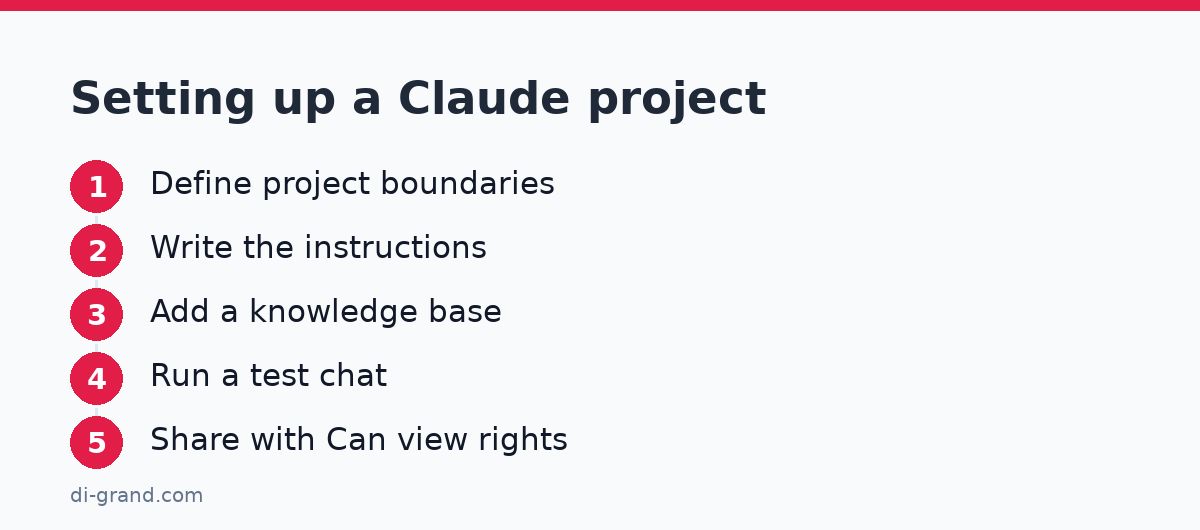
- Define the project’s boundaries. One project is one area, client or type of task (for example, “Blog content” separate from “Paid ads”). Check: can you describe the project in one sentence? Common mistake: one huge “Marketing” project where all files and tones are mixed together.
- Create the project and give it a clear name. A handy pattern is “Department — Area — Year”, for example “Marketing — Blog — 2026”. Check: does a colleague looking at the project list immediately understand what is where? Common mistake: names like “Test 2” or “New”.
- Write the project instructions. Role, audience, tone, response format, prohibitions. There is a sample in the next section. Check: do the instructions fit on roughly one page? Common mistake: pasting the whole brand book into the instructions instead of adding it as a file in the knowledge base.
- Add the knowledge base. Upload 5–10 current documents: a product description, tone of voice, examples of approved texts, an FAQ. Check: are there outdated price lists or duplicates among the files? Common mistake: uploading “everything that was on the drive”, so Claude finds contradictory data and uses the wrong one.
- Run a test chat. Ask three or four typical questions and compare the answers with what you expect. Check: does Claude keep the tone, mention the right product names and avoid inventing facts outside the knowledge base? Common mistake: inviting colleagues before anyone has tested the results on real tasks.
- Add task templates. Save a file in the project with ready-made prompts and structures (brief, report, landing page). Check: can a new employee take a template and get a decent result without help? Common mistake: keeping templates in the head of one “prompt wizard”.
- Share the project (Team or Enterprise). Invite people by email, by a list of emails, or open the project to the whole organization. Permissions: “Can view” means viewing and chatting without editing, “Can edit” means changing instructions and knowledge and managing members. Check: only 1–2 responsible people can edit. Common mistake: giving everyone “Can edit”, so within a month the instructions turn into a dump of other people’s edits.
- Assign an owner and a review date. One person is responsible for keeping the files current, with a review once a quarter or after pricing and positioning changes. Check: the name or instructions say when the project was last updated. Common mistake: “we’ll decide later”, and Claude answers from last year’s price list.
Before sharing a project, go through it as a colleague with “Can view” access would: open a chat and try to complete a typical task using only the existing instructions and templates. Add to the instructions everything you had to guess.
Example project structure for a marketing team
Below is a working setup for a small team made up of a content marketer, an advertising specialist and an SEO specialist. It is an example, not a required standard: change the names and the set of files to fit your own processes.
| Project | What’s in the instructions | Knowledge base | Templates |
|---|---|---|---|
| Marketing — Blog | Tone, article structure, banned wording | Tone of voice, 3–5 approved articles, product list | Article brief, editor’s checklist |
| Marketing — Landing pages | Page structure, CTA rules, response format (HTML) | Service descriptions, USP, testimonials that can be quoted with the authors’ permission | Landing page template, list of blocks |
| Marketing — Reports | Report format, rules for numbers, language of conclusions | Metric definitions, analytics exports for the period, quarterly goals | Weekly and monthly report template |
| Marketing — Ads | Character limits, tone, platform restrictions | Examples of approved ads, target audience | Headline set template |
Project instructions
Good instructions are short and specific: who Claude is in this project, who it writes for, what format it answers in and what it doesn’t do. An example for a landing page project:
|
1 2 3 4 5 6 7 8 |
You are a marketer at a web studio. You write for small business owners in Ukraine. Language: Ukrainian, formal "you", short sentences. Before answering, check the knowledge base: use only the services and terms from it. If data is missing, ask up to three clarifying questions instead of making things up. Landing page format: one HTML file with embedded CSS, blocks: heading, benefits, process, testimonials, FAQ, request form. Never invent prices, testimonials, figures or client cases. At the end, list the places a person needs to check. |
The last couple of lines, the ban on inventing and the requirement to flag doubtful spots, save the editor the most time.
Knowledge base
Add documents that are truly needed for an answer: product descriptions, tone of voice, examples of approved texts, an FAQ, quarterly goals. Plain text, PDFs or spreadsheets work better than scans and files with dozens of “versions”. Rename files clearly: “Price_list_2026_current” reads better than “Copy final2”.
On paid plans, projects scale automatically with RAG (Retrieval Augmented Generation): when the knowledge base approaches the context limit, Claude switches this mode on and expands capacity up to 10 times. In simple terms: instead of holding all the files in memory at once, Claude picks the fragments needed for a specific question. This is convenient, but it means that in a very large knowledge base the right paragraph sometimes doesn’t make it into the answer, so for important tasks ask precise questions and refer to the document by name.
To keep the knowledge base from going stale, pull in files from Google Drive and Slack through integrations. How to do it is described in the article on MCP in Claude and connecting Google Drive.
Templates
A template is a file with a prompt and an example of the expected result. For a report, it might be the structure “What happened — Why — What we do next” plus a list of metrics. For a landing page, it is a list of blocks and the length of each. Keep templates in the knowledge base and refer to them in your requests: “Make a report using the weekly report template.”
What Artifacts offer for landing pages and reports
Artifacts are useful where the result takes the form of a file: you need to see it, change it and pass it on. For a marketing team, the two most obvious scenarios are landing page drafts and reports.

Landing pages
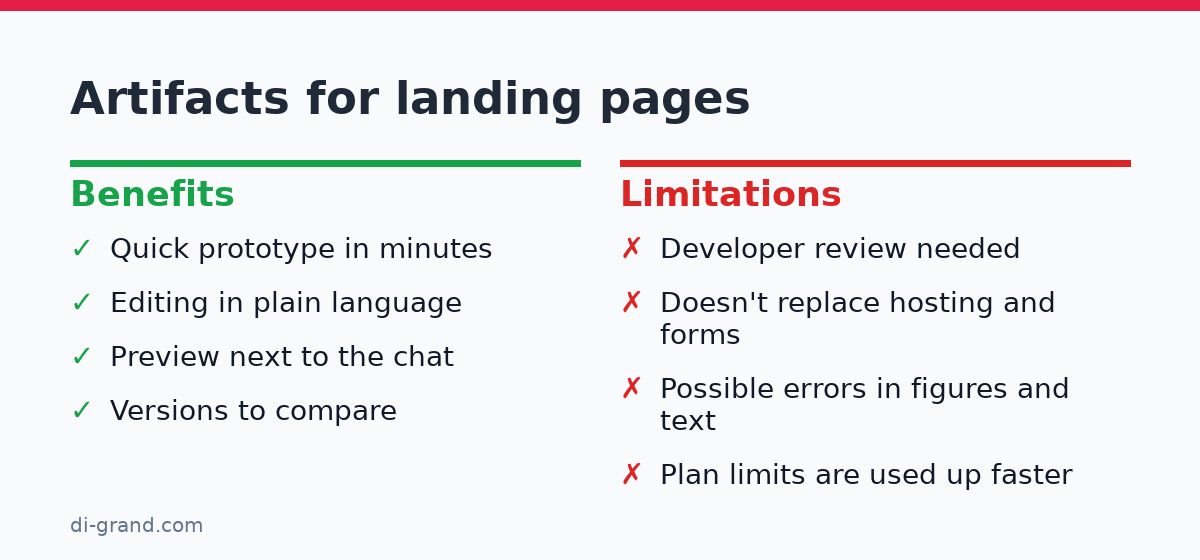
Claude creates a single HTML page with CSS and shows it in a preview next to the chat. You see how the blocks look on screen and ask for changes in plain language: “Make the heading shorter”, “Add a questions block”, “Change the button color to navy”. The artifact updates, and earlier versions stay available, so you can go back to a better one.
The practical value here is a quick prototype for discussion with a client or colleagues, not a page ready to launch. Before publishing on a site you need: adaptation to your theme or builder, speed and accessibility checks, connecting the form and analytics, and legal texts. If the site runs on WordPress, a developer hands over the draft, which is a typical task for our team. To learn how to connect Claude to WordPress through the API, read Claude API WordPress: integration.
Reports
Upload an export from analytics or an ad account into the chat and ask Claude to put together a report: brief conclusions, a table of key figures and a list of next actions. The result opens as a separate document that you can refine and copy. For visualizations, Claude can make a table or a diagram, but final charts for a client are better built in your usual BI tool or spreadsheets.
Example request:
|
1 2 3 4 5 |
Using the weekly report template, prepare a report for April 1–7. Data: the file "Ad_export_April". Needed: 5 key metrics in a table, 3 conclusions, 3 next actions. Don't round the numbers and don't add data that isn't in the file. If something is missing for a conclusion, say so on a separate line. |
Always check numbers in AI-generated reports against the source. Claude can make mistakes in totals, mix up periods or misinterpret file columns. For client reports, add a mandatory human review step.
You can share a view of the result with colleagues, but who exactly can see a published artifact depends on your plan and your organization’s settings. Before sending a link to a client, open it in incognito mode and make sure it contains no internal data.
Access, limits and restrictions: what to keep in mind
Access rights for a shared project are simple, but they affect how orderly the team stays:
| Permission | What it allows | Who should get it |
|---|---|---|
| Can view | View content, knowledge and instructions and chat in the project without editing | Most contributors |
| Can edit | Change instructions and knowledge, add and remove members | The project owner and their deputy |
The project’s creator can change or revoke permissions. Colleagues find projects in the “Shared with me” tab and receive an email notification about access. The organization’s Owner can turn off project sharing, and on Enterprise can do so for individual roles too. If you turn off “Share projects”, “Public projects” is turned off as well, while existing access stays in place.
Don’t upload passwords, API keys, customers’ personal data or contracts not meant for the whole team to a project. Everyone who has been given access can see a shared project, and you should check your plan’s data-handling policy before you start. For your clients’ data protection requirements, consult a lawyer.
Usage limits
Work in projects uses up your plan’s limits just like any other use of Claude, and long documents in context and large artifacts consume them faster. For a team this means: don’t enable dozens of files “just in case”, don’t ask for a landing page to be rewritten twenty times in a row, and split long tasks across several chats.
The new version of projects in beta
Anthropic is testing a new version of projects in which a project becomes a single conversation and Claude splits the work into parallel threads in the cloud. It is first being opened to Claude Code users on Pro, Max and Ultra plans, with chat, Cowork, Team and Enterprise coming later. Each thread starts from the project’s files, instructions and memory, and Library collects files that were added and files Claude created. Existing projects are migrated without loss, including instructions, files and chat history. Several parallel threads use up limits faster, so keep an eye on usage. For Claude Code as a separate tool for developers, see Claude Code: how to use it without breaking your project.
Limitations to know in advance
- Claude can invent facts if they aren’t in the knowledge base, so forbid inventing in the instructions and require it to flag doubts.
- Generated HTML is a draft; it doesn’t replace development, cross-browser testing and speed checks.
- Collaborating on projects requires Team or Enterprise; Free has a limit of five projects.
- A very large knowledge base works through RAG and doesn’t guarantee that every paragraph will be taken into account.
- Texts in Ukrainian usually come out well, but check names, terms and legal wording. Also check whether the service is available in your country and which payment methods the chosen plan supports; this is stated on Anthropic’s website.
Where to start this week
Don’t try to build the perfect system right away. Create one project for the area that puts the most load on your team, such as the blog or reports. Write short instructions, add 5–7 files, save two templates and run a test chat. After two weeks, review what works and add to the instructions based on real mistakes.
If you want to go further, such as adding Claude to your site as a chatbot, setting up product description generation or automating reports, that is a separate stage with its own architecture. Options and costs are covered in the article on an AI chatbot for a WordPress site. And if you need help bringing AI into your processes or onto your site, the DiGrand team will run a consultation and propose a realistic plan with no promises of “miracles”.
FAQ
Can I use Claude Projects for free?
Yes, Projects are available to all users, including those with free accounts, but on Free you can create at most five projects. There is no shared access for colleagues there: it exists only on Team and Enterprise plans.
How do Projects differ from a regular chat?
A regular chat doesn't keep your context between conversations. A project has its own knowledge base, instructions and chat history, so Claude starts each time with rules and documents it already knows.
What is RAG in Claude projects?
It is a mode that switches on automatically on paid plans when the knowledge base approaches the context limit. It expands a project's capacity up to 10 times: Claude picks the fragments needed for a specific question from the base instead of holding all the files in context at once.
How do I give a colleague view-only access?
On Team and Enterprise plans, share the project with the person by email and choose the "Can view" permission. They will be able to view content, knowledge and instructions and chat, but won't change project settings. "Can edit" allows editing instructions and knowledge and managing members.
Can an admin ban shared projects?
Yes, the organization's Owner can turn off project sharing. On Enterprise this can also be done for individual roles. If you turn off "Share projects", public projects are turned off too, while access already granted stays in place.
Leave a Reply